
1a) Understanding of Constraints and Benefits
You should show how you have used or supported others to use technology appropriately, given the constraints and benefits it provides within your context. You should consider how you compared and contrasted the constraints and benefits of different technologies to meet the specific needs of users (students or staff). Evidence in support of such statements might include a brief commentary on the choices behind the development and use of Learning Technology that influence its fitness for purpose. This might discuss issues such as affordances of the technology, viability, sustainability, scalability, interoperability and value for money. Suitable evidence may include a design outline, proposal, conference presentation or similar. Alternatively, you might want to take this opportunity to find out more about a technology you have deployed, and produce a report on its viability, relating this to the constraints and benefits of different technologies.
CMALT Guidance Notes 2019
Over the years I have supported many colleagues to use technology appropriately in roles such as Senior Academic Developer, Project Manager, Head of Student Registry, School Registrar and as a Deputy IT Facilitator. This has included undertaking training needs analysis for academic colleagues and undertaking impact assessments in relation to the implementation of new software. As a result, I have experience with exploring the affordances of different technologies and making recommendations for their adoption.
Using Padlet to engage learners and undertake pre-workshop activities
While working at ALT I developed and implemented a new online workshop delivered through Blackboard Collaborate for CMALT Candidates. The main objective of the workshop was to help CMALT candidates progress work on their portfolios and get them in a position to feel more confident about submitting them. I developed the workshop drawing from my previous experience and worked closely with my line manager to ensure that it met her expectations from an organisational perspective. This included deciding on technologies, setting the agenda for the day, creating resources and planning activities for each of the sessions. I suggested that it would be really helpful to engage the participants in some pre-workshop activities and explored different ways of doing this. I thought this would have a couple of benefits, firstly it would enable us to get more of an idea of who the participants were and what they hoped to gain from the workshop, secondly it would encourage the participants to engage with each other in advance of the day itself and help provide an element of peer support and finally to demonstrate the relaxed and informal atmosphere that I hoped to facilitate for the session itself.🔎CP1
I suggested that we should introduce Padlet for the pre-workshop activities. I’ve used it successfully in other workshops both in-person and online. (I have included a link to my publicly available Padlets below. I describe Padlet as a sort of online pinboard with lots of bells and whistles. I like the fact that it is quite easy to use and is a great way to encourage collaboration (Beltrán-Martín 2019). I find that the real-time updating of the Padlet wall can be really engaging. In terms of the main benefits and constraints of padlet, in my opinion, they can be thought of as follows:
| Benefits | Constraints |
| It is free to use and doesn’t really need any in-depth training to use. | Some participants might not have used it before and may need encouragement to actively post prior to the workshop |
| It is useful for collaborative learning (Beltrán-Martín 2019) | Users who didn’t have a PADLET account would show as anonymous and this may impede community building |
| It can be applied to many different uses | Padlet walls can appear cluttered and potentially confusing to some learners |
I wanted to create an environment where participants could feel comfortable, so using my previous experience and taking into account the benefits and constraints of Padlet, I did this by :
- Giving a brief introduction to Padlet and explaining how to make a post. I made sure I used welcoming language in my posts and explained what the tasks were in an encouraging manner.💗CP3
- I actively commented on participants’ posts so that they felt heard and understood and encouraged commentary on other people’s posts 💗CP3
- I structured the padlet wall using the column structure that it stopped the posts from being messy and cluttered. I have found through trial and error that this helps as each column acts as a container for a specific activity. 🔎CP1
- I explained what activities needed to take place before the workshop and what they needed to do on the Padlet. Participants could use Padlet anonymously if preferred or log in if they had an account and wished to do so. For those remaining anonymous,I encouraged using a nickname to help with connecting in the group. The padlet was also locked down to just those in the session ✅Ethics
- I asked participants to share who they were, what they did and which pathway they were registered for and encouraged them to comment on at least one other person’s contribution so that they could start making connections. In addition, I asked them to share their journey so far and how they were feeling about doing CMALT by posting an image that best depicted their journey. This would be used on the day of the workshop as an icebreaker. Participants were given the option to do this in text format if they preferred to do this. 💗CP3
- I also included a prompt for participants to undertake some private reflection on their portfolios which they did not need to share on the padlet but would provide a useful basis for the workshop. In addition I also asked them to indicate what specific help they would like on the day. This helped to tailor the workshop to best fit their requirements.
- Finally, I gave an overview of what the day would entail and provided useful links to helpful information in advance of the day itself.
Reflection
I remember being quite nervous in the run-up to the delivery of the very first workshop and a little unsure of how things would play out. I was keen to provide a good experience for the participants and to ensure that the workshop itself would be successful, in my mind this mean therefore that it was crucial that the preliminary activities were completed. Overall, the workshop and pre-workshop activities were well received by participants,There was a good sense of collaboration and I felt that the work that I had done in advance of the session had helped to set the scene and help participants connect and share with each other. 📢CP4 This was echoed specifically by one of the participants who felt that the pre-workshop activities had helped to ‘shorten the distance’ that she experienced.
I learned that using Padlet before the workshop worked well as this helped connect people so that they felt comfortable before starting the workshop itself. Using a structured layout really helped participants stay on track. Participants I felt that overall using Padlet was fit for purpose and offered a good experience for the pre-workshop activities. After each session, I reflected on how I thought it went and what I thought I could do better for each one. I, therefore, used this to make small tweaks to each session in an attempt to improve. An example of one of the tweaks I made was introducing a welcome video from me before the workshop and a wrap-up video afterwards which really set the tone for the warm environment I hoped to create. I posted these on the padlets and provided links directly to the participants. I did this on subsequent iterations of the workshop as can be seen below
Evidence
Extract from Web Page showing promotion of event and participant testimonials

https://www.alt.ac.uk/certified-membership/cmalt-support#AcceleratorWorkshops
Feedback from Participants
The blog post mentioned above can also be found here. In it, Dr Jin Tan highlights her experience of the workshops including the pre-workshop activities and how she found them helpful
‘I felt the guided pre-workshop self-introduction shortened my distance with other attendees and gave me a clue of who I would meet. Interestingly and unexpectedly, I met a former colleague who now works in another institution, but we never met in person before. In the workshop, various activities covered the most important factors in regard to writing the portfolio. It focused on helping us to prepare and understand how to demonstrate our practice.’
Dr Jin Tan 2021
CMALT Accelerator Workshop Padlet Screenshot January 2021
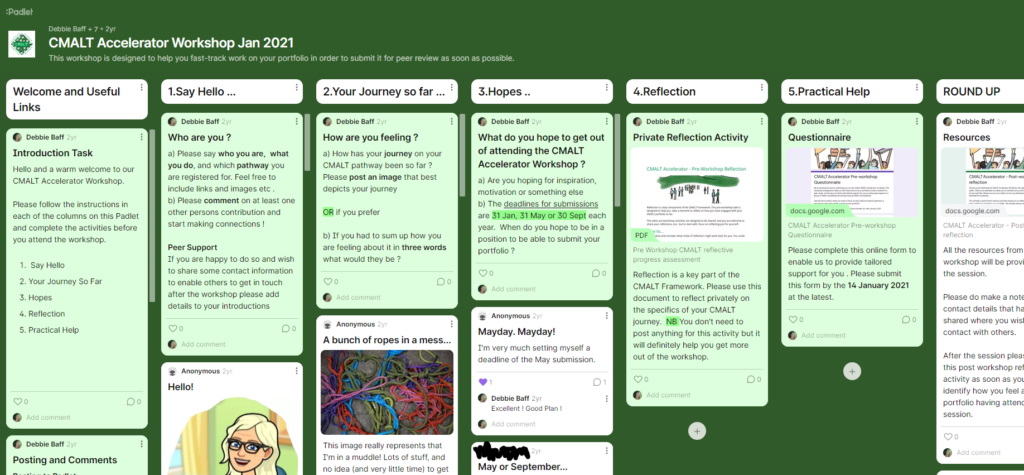
CMALT Accelerator Workshop Padlet Screenshot Oct 2021

Example of Introduction Video added in as a result of my own reflection on delivering the workshops
Example of Wrap up Video added in as a result of my own reflection on delivering the workshops
Examples of more feedback from Participants
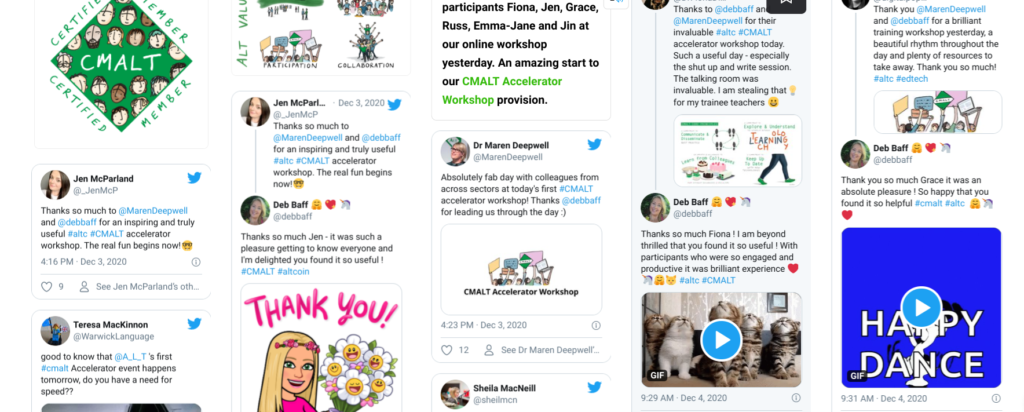
As you can see from the above image we had some great comments from participants. Please also see Wakelet Link below for direct access. Wakelet Link
Link to my Public Padlets
| Core Principles & Ethics | Key |
| A commitment to exploring and understanding the interplay between technology and learning | 🔎CP1 |
| A commitment to keep up to date with new technologies | 💻CP2 |
| An empathy with and willingness to learn from colleagues from different backgrounds and specialisms | 💗CP3 |
| A commitment to communicate and disseminate effective practice | 📢CP4 |
| Ethical Considerations | ✅Ethics |


 CP1] A commitment to exploring and understanding the interplay between technology and learning.
 CP2] commitment to keep up to date with new technologies.
 CP4 ] A commitment to communicate and disseminate effective practice
 Ethics] Ethical Considerations
You must be logged in to post a comment.